Lesson 2 - Executing SQL Commands in DB Browser

Lesson Overview
In this lesson, we'll explore how to interact with SQLite databases using SQL commands within DB Browser. We'll cover:
- A New Database - entertainment.db: A more comprehensive dataset for practicing SQL queries.
- The "Execute SQL" Tab: Where you'll write and execute SQL commands.
- SELECT, FROM, WHERE: The essential clauses for retrieving specific data.
- Experimenting with SQL Commands: Hands-on practice with SELECT, FROM, WHERE.
Executing SQL Commands
While DB Browser's graphical interface provides a gentle introduction to SQLite, the true power of this database system lies in its ability to understand and respond to SQL commands. These commands offer a precise and flexible way to interact with your data, allowing you to perform tasks that would be cumbersome or impossible with the graphical interface alone.
A New Database
For this lesson, we'll be working with a new database called "entertainment.db". This database contains information about popular 80s movies and top selling music albums. To proceed, please open this database in DB Browser.
Task: Open the 'entertainment.db' Database
- Go to "File" → "Open Database".
- Locate the "entertainment.db" file and click "Open".
You should now see the "entertainment.db" database loaded in DB Browser, with the "movies_80s" and "top_albums" tables listed in the "Database Structure" tab.
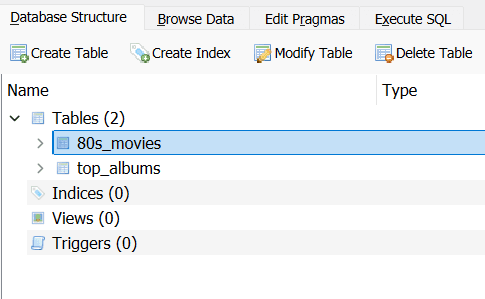
- Take a moment to browse the data, play with filters and get a sense of the size of the data set.
Exploring the "entertainment.db" Dataset
The "entertainment.db" database offers a somewhat limited but nonetheless potentially interesting repository of information for practising your SQL querying skills. It houses two tables, each with a distinct set of attributes:
Structure of entertainment.db
- "movies_80s": A collection of films from the 1980s, meticulously ranked from 1 to 10 based on ticket sales for each year. It includes details such as title, release date, distributor, and genre. One could, for example, query this table to uncover the most popular genres of the decade or to track the performance of a particular distributor over time.
- "top_albums": A compilation of Rolling Stone magazine's top 500 albums of all time, as judged in 2012. Or at least, most of them. A few entries have been discreetly removed to ensure this tutorial remains suitable for younger audiences, so you may find some unexpected gaps in the rankings. The table provides information on the ranking, year of release, album title, artist, genre, and subgenre. One might, with sufficient effort, use SQL to identify trends in musical taste across different eras or to analyse the representation of various genres within the list.
With these datasets at your disposal, the possibilities for exploration are perhaps not endless, but certainly sufficient for our current purposes. But how does one access and analyse this information? The "Execute SQL" tab provides the means.
The "Execute SQL" Tab
The "Execute SQL" tab in DB Browser is your interface for interacting with these datasets using SQL commands. Here, you can construct queries to retrieve specific data, filter records based on certain criteria, and perform basic calculations.
To access this tab, simply click on "Execute SQL" in DB Browser. You'll be presented with a text editor for composing your SQL queries and a button to execute them. The results will be displayed below, offering a glimpse into the patterns and trends hidden within the data.
Task: Execute an SQL Query to Retrieve Top-Ranked Movies
- Open the "Execute SQL" tab in DB Browser.
- Type the following SQL query into the query editor:
SELECT title, release_date FROM movies_80s WHERE rank = 1 - Press the "Execute" button (looks like the play icon)
The query result should display the title of the top-ranked movie in the "movies_80s" table from each year, as shown below:
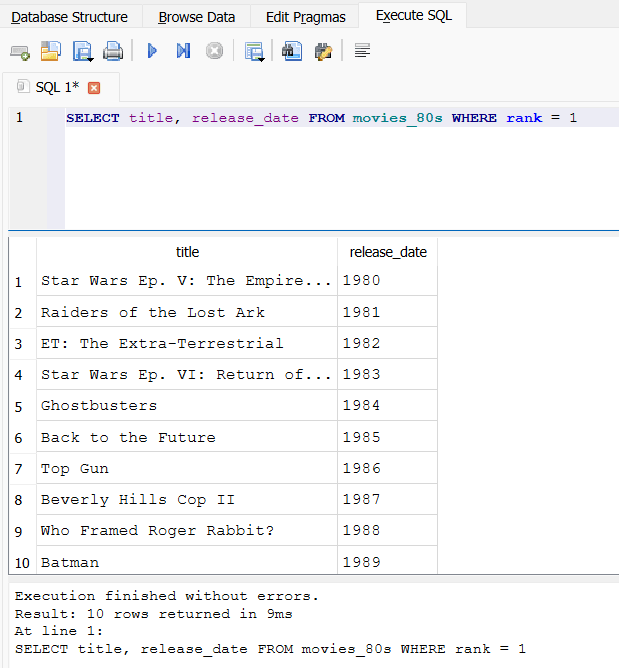
- Try changing the ranking to a higher number. Do you still recognise the film?
In the following sections, we'll examine the fundamental SQL clauses that will enable you to navigate and analyse these datasets with a modicum of confidence.
SELECT, FROM, WHERE
The SELECT, FROM, and WHERE clauses are the building blocks of SQL queries. They allow you to specify what data you want to retrieve and under what conditions. Let's break down each clause:
- SELECT: Specifies the columns you want to retrieve from the database.
- FROM: Specifies the table from which you want to retrieve the data.
- WHERE: Filters the records based on specific conditions.
The WHERE Clause: Your Data Detective
In the world of SQL, the WHERE clause acts like a detective, helping you pinpoint exactly the information you need from your database. Think of it as a filter that sifts through your data and only reveals the records that match your specific criteria.
WHERE in Action: "80s_movies"
Let's say you want to find all the movies in your movies_80s table that were distributed by Warner Bros. You would use the WHERE clause with a condition:
SELECT * FROM movies_80s WHERE distributor = 'Warner Bros'This query tells the database: "Show me all the columns (*) from the 'movies_80s' table, but only where the 'distributor' field is equal to 'Warner Bros.'"
WHERE's Versatility
The WHERE clause is incredibly versatile. You can use it with various operators to create different conditions:
- =: Equal to
- != or <>: Not equal to
- <: Less than
- >: Greater than
- <=: Less than or equal to
- >=: Greater than or equal to
- LIKE: Matches a pattern (e.g., '1985%')
- BETWEEN: Within a range of values
- IN: Matches any value in a list
You can even combine multiple conditions using AND, OR, and NOT to create more complex filters.
By combining these clauses, you can craft queries that extract precisely the information you need. Let's put this into practice with a few examples.
Task: Practice with SELECT, FROM, WHERE
Try the following queries to retrieve specific data from the "movies_80s" table. Try these by yourself, but if you get stuck, you can check the solution below each question or better still take a "look", "cover", "query", "check" approach.
- Retrieve the title and genre of all movies released in 1985.
SELECT title, genre FROM movies_80s WHERE release_date = 1985 - Retrieve the title and distributor of movies with a rank greater than 5.
SELECT title, distributor FROM movies_80s WHERE rank > 5 - Retrieve the title and release date of movies with the genre "Comedy".
SELECT title, release_date FROM movies_80s WHERE genre = 'Comedy' - Retrieve the title and tickets sold of movies with the distributor "Warner Bros."
SELECT title, tickets_sold FROM movies_80s WHERE distributor = 'Warner Bros.' - Retrieve the title and rank of movies with the genre "Action" and a rank less than or equal to 3.
SELECT title, rank FROM movies_80s WHERE genre = 'Action' AND rank <= 3 - Retrieve the title and release date of movies with a release date between 1983 and 1986.
SELECT title, release_date FROM movies_80s WHERE release_date BETWEEN 1983 AND 1986 - Retrieve the title and distributor of movies with the distributor "Universal" or "Columbia".
SELECT title, distributor FROM movies_80s WHERE distributor = 'Universal' OR distributor = 'Columbia' - Retrieve the title and genre of movies with a genre in ("Comedy", "Adventure", "Action").
SELECT title, genre FROM movies_80s WHERE genre IN ('Comedy', 'Adventure', 'Action') - Retrieve the title and tickets sold of movies with a rank between 3 and 6, and a release date after 1984.
SELECT title, tickets_sold FROM movies_80s WHERE rank BETWEEN 3 AND 6 AND release_date > 1984 - Retrieve the title and distributor of movies with a genre not in ("Comedy", "Adventure"), a rank less than 5, and tickets sold greater than 20,000,000.
SELECT title, distributor FROM movies_80s WHERE genre NOT IN ('Comedy', 'Adventure') AND rank < 5 AND tickets_sold > 20000000 - Experiment with different combinations of SELECT, FROM, and WHERE to explore the dataset further.
As you practice with these queries, you'll gain a deeper understanding of how to extract meaningful insights from the dataset. Feel free to experiment and explore the data to your heart's content!
Using !=, <>, NOT, and Wildcards
In SQL, you can use != or <> to express "not equal to". Both operators achieve the same result. For instance, to retrieve all movies NOT released in 1985, you could use either of the following queries:
SELECT * FROM movies_80s WHERE release_date != 1985;SELECT * FROM movies_80s WHERE release_date <> 1985;The keyword NOT is used in different contexts, such as with the IN and BETWEEN operators. For example, to retrieve movies with a genre NOT IN ('Comedy', 'Adventure'), you would use:
SELECT * FROM movies_80s WHERE genre NOT IN ('Comedy', 'Adventure');To search for patterns within text data, you can use wildcards with LIKE Operator. The most common wildcards are:
- % (percent sign): Represents zero or more characters. For example,
LIKE '%Rock%'would match "Rock", "Rock and Roll", "Psychedelic Rock", and any other string containing "Rock". - _ (underscore): Represents a single character. For example,
LIKE 'Bl_es'would match "Blues" but not "Blues Rock".
For instance, to find all albums with "Rock" in their subgenre (remember that an album can have multiple subgenres, separated by commas and a space), you would use:
SELECT * FROM top_albums WHERE subgenre LIKE '%Rock%';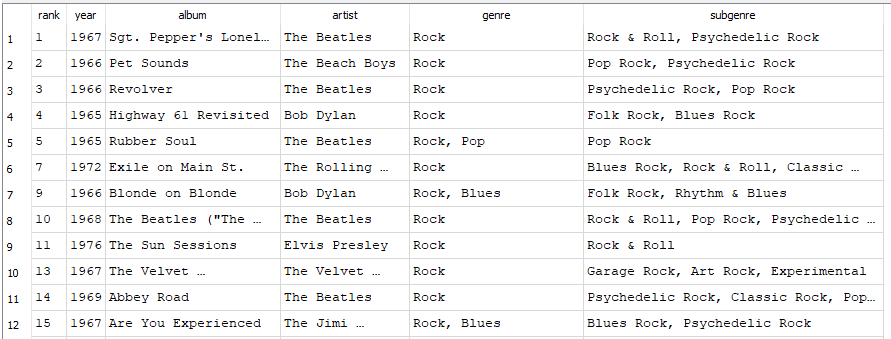
Or to find albums where the artist starts with "The" you would use:
SELECT rank, year, album, artist FROM top_albums WHERE artist LIKE 'The%';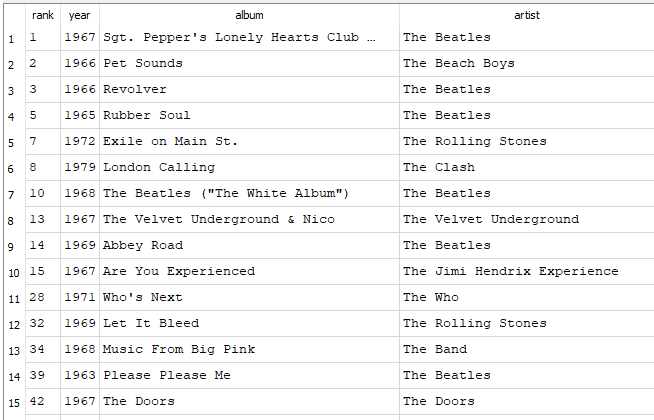
The "top_albums" table presents a curated selection of influential music albums, spanning various genres and eras. Using the SELECT, FROM, and WHERE clauses, you can craft queries to explore this dataset in greater detail.
Task: Practice - Explore 'top_albums'
Using your newfound SQL querying skills, answer the following questions: Remember to utilise the SELECT, FROM, and WHERE clauses, along with the operators we've covered (such as =, >, <, BETWEEN, IN, NOT IN, LIKE, etc.) to construct your queries. Again, try these by yourself, but if you get stuck, you can check the solution below each question or better still take a "look", "cover", "query", "check" approach.
- Which albums from the 1970s have "Rock" as their genre?
SELECT * FROM top_albums WHERE year BETWEEN 1970 AND 1979 AND genre = 'Rock' - What are the titles and artists of the top 10 ranked albums?
SELECT album, artist FROM top_albums WHERE rank <= 10 - Which albums are classified as "Funk / Soul"?
SELECT * FROM top_albums WHERE genre = 'Funk / Soul' - Find all albums with "Blues" in their subgenre.
SELECT * FROM top_albums WHERE subgenre LIKE '%Blues%' - Which albums were released between 1965 and 1975, and have "Rock" in their genre?
SELECT * FROM top_albums WHERE year BETWEEN 1965 AND 1975 AND genre = 'Rock' - Find all albums by The Beatles or The Rolling Stones.
SELECT * FROM top_albums WHERE artist = 'The Beatles' OR artist = 'The Rolling Stones' - Which albums have a subgenre of "Folk Rock" or "Pop Rock"?
SELECT * FROM top_albums WHERE subgenre = 'Folk Rock' OR subgenre = 'Pop Rock' - Find all albums that are NOT "Rock" genre.
SELECT * FROM top_albums WHERE genre != 'Rock' - Which albums ranked between 20 and 50 have "Pop" in their subgenre?
SELECT * FROM top_albums WHERE rank BETWEEN 20 AND 50 AND subgenre LIKE '%Pop%' - Find all albums with "Alternative" in their subgenre that were NOT released in the 1990s.
SELECT * FROM top_albums WHERE subgenre LIKE '%Alternative%' AND NOT year BETWEEN 1990 AND 1999
Remember to utilise the SELECT, FROM, and WHERE clauses, along with the operators we've covered (such as =, >, <, BETWEEN, IN, NOT IN, LIKE, etc.) to construct your queries.
Lesson Summary
In this lesson, we explored how to interact with SQLite databases using SQL commands within DB Browser. We covered the "entertainment.db" dataset, the "Execute SQL" tab, and the SELECT, FROM, and WHERE clauses. By practicing with SQL queries, you've gained a foundational understanding of how to retrieve specific data from a database and filter records based on certain criteria.
SQL Formatting Conventions
While SQL doesn't enforce strict formatting rules, consistent conventions improve readability. Common practices include:
- Keywords in uppercase: Write SQL keywords (SELECT, FROM, WHERE, etc.) in uppercase to distinguish them from other elements in your query.
- Table and column names in lowercase: Using lowercase for table and column names helps maintain consistency and differentiate them from keywords.
- Indentation: Indenting clauses and expressions, especially in complex queries, makes the structure of your query clearer and easier to follow. For instance, indent the content of the WHERE clause in relation to the WHERE keyword itself, and indent any AND/OR operators with respect to the WHERE.
SELECT title, genre FROM movies_80s WHERE genre = 'Comedy'; - Newlines: Using newlines to separate different parts of your query can also improve readability. For instance, you can place each clause (SELECT, FROM, WHERE) on a new line. For longer queries, consider placing each column in the SELECT statement on a new line. It ultimately doesn't matter if you choose to write your query on a single line or multiple lines, as long as it is readable.
SELECT title, genre FROM movies_80s WHERE genre = 'Comedy';
These practices make your SQL queries easier to read and modify.